 MADE FOR YOUR EVERYDAY
Nepali Calendar App
Your dates. Your daily essentials.
A little closer to home.
Keep the Nepali calendar, festivals, Rashifal, useful tools and radio in one calm, familiar place. Made for Android, in नेपाली and English.
DIRECT FROM NEPALICAL.COMDownload for AndroidFree · Android 8.0+ · 8.1 MB
Installing for the first time?Direct APK download from nepalical.com · Preview release
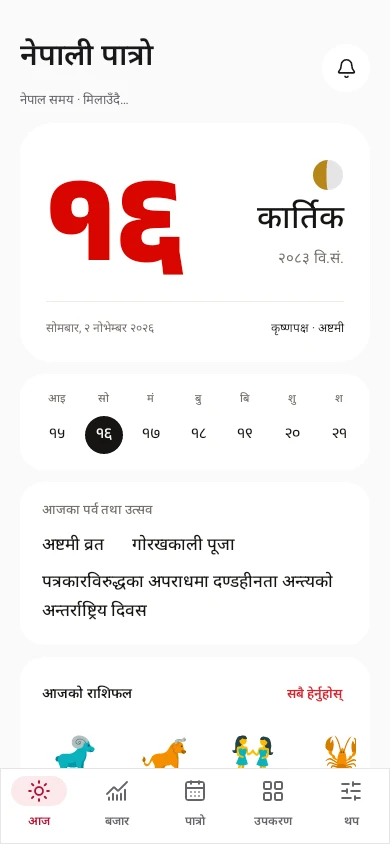
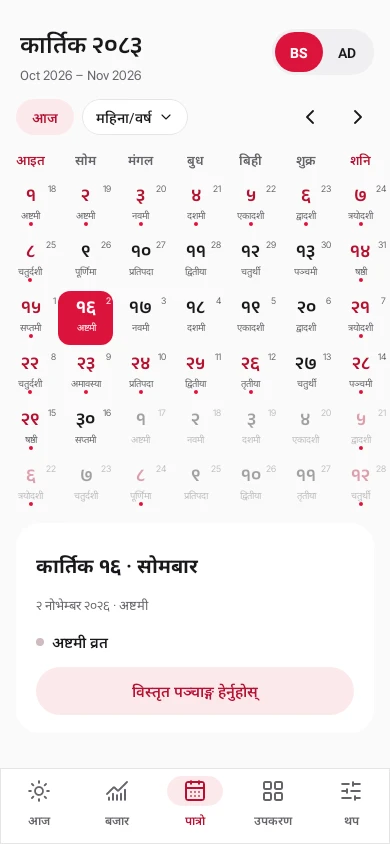
One app. A useful part of every day.
Start with today, then explore what you need. No account required.
Your dates, in both calendars
Browse BS and AD dates, tithi, holidays and festival guides. The bundled calendar travels with you offline.
02Useful tools, always close
Convert dates, calculate age, type in Nepali Unicode, and work with currencies or gold and silver values.
03A daily connection to Nepal
Read Rashifal, generate your Janam Kundli with dasha, KP and varga charts, check dated market publications, browse headlines and listen to Nepali online radio.
04A place on your home screen
Choose from ten widgets, set reminders and make the app yours with language, theme and text-size options.
Install with confidence.
This is a direct Android APK release. It is not currently distributed through Google Play or Galaxy Store. Your phone may ask you to approve the installation source.
- 1
Download from this page
Open nepalical.com/app on your Android phone and use the download button. Check the version and file details below.
- 2
Open the APK
Open the completed download. If asked, allow this browser or file manager to install apps. Approve only the source you are using for this download.
- 3
Install, then open the app
Choose your language and comfortable text size. Notifications are optional for reminders and the persistent date display.
- 4
Restore the installation setting
After installation, you can remove the browser’s installation permission. If you temporarily changed Samsung Auto Blocker, turn it back on.
Samsung phone? Check Auto Blocker.
On supported Galaxy phones, Auto Blocker can prevent all installations outside approved app stores. To install this direct download, you can temporarily change it under Settings → Security and privacy → Auto Blocker.
Then search Settings for Install unknown apps and permit the browser or file manager opening this APK. Complete installation, remove that source permission if you no longer need it, and restore Auto Blocker. Names and availability depend on your phone’s One UI version.
These controls govern where apps may be installed from. Read Samsung’s installation guidance and its Auto Blocker explanation.
What about Play Protect or another restriction?
Keep Google Play Protect enabled. If it offers a security scan for an unfamiliar app, let it check the file. A harmful-app warning is different from an installation-source setting: stop installation and send us the exact warning if the APK is flagged as harmful.
A work, school or supervised phone may have an administrator-controlled restriction. Ask the administrator for help. The app cannot override that policy.
Useful features. Straightforward permissions.
The app does not request access to your contacts, SMS, photos or location. Internet is used for online publications, radio and requested Kundli calculations. Notification permission supports optional date updates and reminders; background playback supports radio.
Preferences, saved items and reminders are stored locally. Kundli birth details are sent only to our first-party calculation service and are not stored there; parent names remain on your device. Online stations and article images connect to their respective providers. Read the privacy policy and sources and methodology for more detail.
A real question? Talk to usA few useful answers.
Is the Nepali Calendar app free?
Yes. The Android APK on nepalical.com is free to download and use. No account is needed to browse the calendar or use the bundled tools.
Does the Nepali Calendar app work offline?
The bundled calendar, festival guides and date tools work offline. Fresh Rashifal, published market rates, news and online radio need internet. Saved publications remain available with their publication dates.
Which Android phones can install the app?
The app supports Android 8.0 and newer. It adapts to phones, tablets and foldable screens. Device settings can affect reminders, widgets and background radio.
How do I install the Nepali Calendar APK?
Download the APK from this page, open the file and approve installation. If Android requests permission, allow installations from the browser or file manager that opened this download. You can remove that permission again after installing.
Why does Samsung Auto Blocker stop the installation?
Auto Blocker can restrict every installation outside authorized app stores. If you choose to install this direct APK, open Settings, then Security and privacy, then Auto Blocker, and temporarily switch it off. Install the APK from this page, then switch Auto Blocker back on. Menu names vary by Galaxy model and One UI version.
Should I turn off Google Play Protect?
Keep Play Protect enabled. If Google offers to scan an unfamiliar app, allow the security check. An installation-source restriction is different from a warning that an APK is harmful. If this download receives a harmful-app warning, stop and send us the exact message so we can investigate.
How do I update without losing my saved settings?
Download the newer APK from this same page and install it over the existing app. Compatible updates use the same app identity and signing certificate. Keep the installed app in place; uninstalling it can remove local data.
Why does Android say “App not installed”?
Check that your phone has enough free space, supports Android 8.0 or newer and downloaded the complete APK. A differently signed test build cannot update the public release. Contact us before uninstalling an app that contains settings or reminders you want to keep.
Is there an iPhone version?
This download is for Android. On iPhone, you can use the Nepali Calendar website in your browser.
What permissions does the app use?
Internet is used for online publications and radio. Notifications are optional for date updates and reminders. Background playback lets radio continue when you leave the screen. The app does not request contacts, SMS, photos or location access.
Ready when you are.
Download the same signed app identity for compatible updates. Install over the existing version to keep local settings.
DIRECT FROM NEPALICAL.COMDownload for Android- Version
- 2.1.28-preview
- Compatibility
- Android 8.0 and newer
- Download size
- 8.1 MB
- Published
- Package
- com.nepalical.nepalicalander
Verify this download
SHA-256 identifies this exact APK file. It does not replace an on-device security scan.
1641c9b53307c0fd7c91c546eca9852f0cc19cc036d5a01eb92b5f3ef9e575baSigning certificate SHA-256
bc1a36265bba6f204d8db29bd2b98380809eca283c970fca395c214896381538